
HOWTO SQL: SIERRA
Slides: https://rayvoelker.github.io/chpl-howtosql-2022/
SQL Sandbox: https://wiliug2022.cincy.pl
Ray Voelker
ray.voelker@chpl.org
Overview of Relational Databases
- Data in these types of databases are stored in collections, or tables
- Tables have a number of rows and columns
- Each row is (often) represented with a unique key.
Overview of Relational Databases: Keys
Keys (typically called ID’s in the Sierra Database) come in two varieties, and they define the relationship between tables.
- Primary Key
- Foreign Key
Overview of Database Entity-Relationship Model
(ERM View)
- Defines the types of relationships that can exist between entities (tables)
- One-to-One
- One-to-Many (most common relationship)
- Many-to-Many
Database Entity-Relationship Model
One-to-One
- A Country can have one (and only one) Capital City
- A Capital City can have one (and only one) Country
Database Entity-Relationship Model
One-to-One
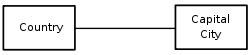
Database Entity-Relationship Model
One-to-Many
- A Mother may have many Children
- A Child has only one (biological) Mother
Database Entity-Relationship Model
One-to-Many
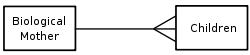
Database Entity-Relationship Model
Many-to-Many
- Authors can write several Books
- Books can be written by several Authors
Database Entity-Relationship Model
Many-to-Many

Relational Databases: Relationships (JOINS)
- Sets of data can be derived from Relational Operators from traditional math sets.
- We'll cover two of the more common JOIN operations
- JOIN (or INNER JOIN)
- LEFT JOIN (or LEFT OUTER JOIN)
Relational Databases: Relationships (JOINS) cont.
JOIN (or INNER JOIN)
- Most common type of join that there is
- Given two sets, A (left) and B (right), performing this join will return a set containing all elements of A that also belong to B.
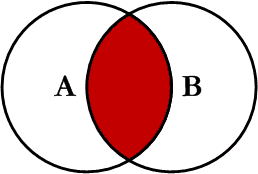
Relational Databases: Relationships (JOINS) cont.
LEFT JOIN (or LEFT OUTER JOIN)
- Given two sets, A (left) and B (right) performing this join will return a set containing all elements of table A, as well as the elements of A that also belong to B
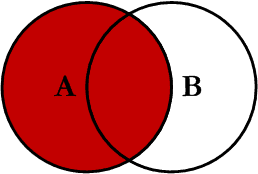
Relational Databases: Relationships (JOINS) cont.
A good explanation in "Simple English" of SQL JOIN operations can be found on this Wikipedia pagehttps://simple.wikipedia.org/wiki/Join_(SQL)
SQL Overview
- Structured Query Language
- Standardized language that allows a user to interface with a relational database
- ("Oral history interview with Donald D. Chamberlin" https://conservancy.umn.edu/handle/11299/107215)
SQL Overview cont.
- SQL statements are groups of clauses or other statements that define the operation on the database
- Some of the more common statements include the following... (SQL is picky about the order in which these statements appear in so they're presented in the order that they can appear in the statement.)
SQL Overview cont.
-
SELECT
- Retrieves data from tables
- Most commonly used statement
-
UPDATE and SET
- Modifies a set of existing table rows
-
DELETE
- Remove set of existing rows from the table
SQL Overview cont.
-
CREATE (TEMPORARY TABLE)
- Typically used to create a table in the database
-
Can be used to create TEMPORARY table for use in subsequent queries
(exists for the duration of a database session, and is dropped when the connection or session ends)
SQL Overview cont.
-
FROM
- Indicates which table to retrieve data from
-
JOIN / LEFT JOIN / etc
- Performing a join will combine the data with that of another table
SQL Overview cont.
-
WHERE / WHERE IN
- Include or exclude data based on comparisons
-
GROUP BY
- Reduces sets into common values
-
HAVING
- Allows for filtering of the GROUP BY statement
SQL Overview cont.
-
ORDER BY
-
Sort the set
in ascending order (ASC)
or descending order (DESC)
-
Sort the set
-
LIMIT / OFFSET
- Returns specific numbers of rows from given starting point
- Usually used in conjunction with the ORDER BY clause to ensure the set is always presented in the same order
SQL Overview cont.
-
WITH
- the `WITH` clause allows you to form a special type of subquery usually called a "Common Table Expression," or CTE for short
- This is especially handy for improving the readability of a query. More examples later!
- Using a CTE can be very powerful, and has the ability to reduce the complexity of your query!
SQL SELECT Statements
- FINALLY SOME EXAMPLES!
- Let us say we wanted a list ...
- Bib Record info
- 10 Oldest (earliest dates created)
- The following query would give us a very basic view of those records:
SELECT
  r.id, r.record_type_code,
  r.record_num, r.creation_date_gmt,
  r.deletion_date_gmt, r.num_revisions
FROM
  sierra_view.record_metadata AS r
WHERE
  r.record_type_code = 'b'
ORDER BY
  r.creation_date_gmt ASC
LIMIT
  10
Quick Note
How do we know what data is where and in what tables in the Sierra DB, and also what?!The Sierra Services Platform incorporates a PostgreSQL relational database that captures the library's material, circulation, patron, financial, and operational data. A collection of database views provides direct access to the library's bibliographic and transactional data. Each view is constructed from one or more tables and can be queried as a single table. Views are read-only.
SQL SELECT Statements cont.
- Suppose we have a short list of bib record numbers,
and we wanted to generate a list of attached item data including the following attributes...
- item status code
- location code
- call number
- barcode
- The following query would get us started on that list...
SQL SELECT Statements cont.
Filter by specific bib numbers ...
SELECT
r.id as bib_record_id,
r.record_num,
r.creation_date_gmt
FROM
record_metadata AS r
WHERE
r.record_type_code = 'b'
AND r.record_num IN (
	1000408,
	1171546,
	2536827,
	2588448,
	3255849,
	3282825,
	1012434
)
SQL SELECT Statement cont.
- This is a good start ... but how do we get to the item data from the bib record?
- We'll use a JOIN!
- Looks like table "bib_record_item_record_link" has what we need
- ...there are two additional tables, "item_record" and "item_record_property" that have the data we need, so we'll just JOIN them as well!
SQL SELECT Statements cont.
- You (probably) didn't notice, but the previous query output of our list of bib record numbers only contained 6--it should have had 7
LEFT JOIN (or LEFT OUTER JOIN)
- Given two sets, A (left) and B (right) performing this join will return a set containing all elements of table A, as well as the elements of A that also belong to B
SQL GROUP BY / HAVING and Aggregate Functions
- GROUP BY
- Reduces sets into common values, or groups results of one or more column together
- Often used along with aggregate functions
- COUNT()
- SUM()
- MAX()
SQL GROUP BY / HAVING and Aggregate Functions cont.
- How many Titles are there in our database that have
- publish_year of 1977?
SQL GROUP BY / HAVING and Aggregate Functions cont.
SELECT
  p.publish_year,
  count(*) as count_titles
FROM
  bib_record_property as p
WHERE
  p.publish_year = 1977
GROUP BY
  p.publish_year
SQL GROUP BY / HAVING and Aggregate Functions cont.
- When grouped by publish_year How many publish_year values are there having a count of 300 or more titles?
SQL GROUP BY / HAVING and Aggregate Functions cont.
SELECT
  p.publish_year,
  count(*) as count_titles
FROM
  bib_record_property as p
GROUP BY
  p.publish_year
HAVING
  count(*) > 300
SQL GROUP BY / HAVING and Aggregate Functions cont.
- Of the titles grouped by their publish_year having a count of 300 or more titles, how many attached items have a status of "CHECK SHELVES" (`-`)?
SQL GROUP BY / HAVING and Aggregate Functions cont.
SELECT
  p.publish_year,
  count(*) as count_titles
FROM
  bib_record_property as p
GROUP BY
  p.publish_year
HAVING
  count(*) > 300
SQL GROUP BY / HAVING and Aggregate Functions cont.
SELECT
  p.publish_year,
  count(*) as count_titles,
  (
    SELECT
      count(*)
    FROM
      bib_record_property as p2
      LEFT join bib_record_item_record_link as l2 on l2.bib_record_id = p2.bib_record_id
      LEFT join item_record as i2 on i2.record_id = l2.item_record_id
    WHERE
      p2.publish_year = p.publish_year
      AND i2.item_status_code = '-'
  ) as count_available_items
FROM
  bib_record_property as p
GROUP BY
  p.publish_year
HAVING
  count(p.bib_record_id) > 300
SQL Common Table Expression (CTE) WITH Clause
WITH target_bib_item_data AS (
	-- first, gather the bib AND attached item data
	--   that meet our filter requirements
	SELECT
		p.publish_year,
		p.bib_record_id,
		i.record_id AS item_record_id,
		i.item_status_code
	FROM
		bib_record_property as p
		LEFT JOIN bib_record_item_record_link as l on l.bib_record_id = p.bib_record_id
		LEFT JOIN item_record as i on i.record_id = l.item_record_id
	WHERE
		p.publish_year IN (
		SELECT
			p2.publish_year
		FROM
			bib_record_property as p2
		GROUP BY
			p2.publish_year
		HAVING
			count(*) > 300
		)
	) --
	-- second, SELECT from the above CTE
SELECT
	t.publish_year,
	count(DISTINCT t.bib_record_id) as count_titles,
	count(t.item_record_id) FILTER (WHERE t.item_status_code = '-') AS 'count_item_status_dash',
	count(t.item_record_id) AS count_total_items
FROM
	target_bib_item_data AS t
	GROUP BY
	t.publish_year
Subquery
- Subqueries are simply nested queries
- Can occur in the SELECT, FROM, or WHERE clauses
- Useful to use to use as a filter in the WHERE clause, or limiting to a single value in the SELECT clause (unexpected one-to-many situations)
Subquery cont.
- Are there multiple barcodes associated with single item records?
- Start by getting a set of item record ID values where the item_record_id appears multiple times when joining to the barcode varfield value
Subquery cont.
SELECT
  ir.record_id
FROM
  item_record as ir
  JOIN varfield AS vf ON vf.record_id = ir.record_id
    AND vf.varfield_type_code = 'b'
GROUP BY
  ir.record_id
HAVING
  count(*) > 1
Subquery cont.
SELECT
  i.record_id as item_record_id,
  r.record_num as item_record_num,
  i.location_code,
  v.field_content,
  v.occ_num
FROM
  item_record as i
  JOIN record_metadata as r ON r.id = i.record_id
  JOIN varfield AS v ON v.record_id = i.record_id
  AND v.varfield_type_code = 'b'
WHERE
  i.record_id IN (
    SELECT
      ir.record_id
    FROM
      item_record as ir
      JOIN varfield AS vf ON vf.record_id = ir.record_id
      AND vf.varfield_type_code = 'b'
    GROUP BY
      ir.record_id
    HAVING
      count(*) > 1
  )
ORDER BY
  i.record_id,
  v.occ_num
CASE Statement
- Returns a value when a condition is met
- Helpful for
- formatting one value into another value
- creating values to aggregate on
CASE Statement cont.
- Produce a list of item record numbers and give a nicer name for the 'item_status_code' value
CASE Statement cont.
SELECT
  r.record_num AS item_record_num,
  i.item_status_code,
  CASE
    WHEN item_status_code = '-' THEN 'AVAILABLE'
    WHEN item_status_code = 'o' THEN 'LIB USE ONLY'
    ELSE item_status_code
  END as our_item_status
FROM
  item_record as i
  JOIN record_metadata as r ON r.id = i.record_id
ORDER BY
  r.creation_date_gmt ASC
LIMIT
  10
CASE Statement cont.
-
From the location "Main Science Stacks" (2sa), produce a count of items based on their last circulation dates
- '1-recent checkouts' = 2020-01-01 to Present
- '2-kinda-recent checkouts' = 2018-01-01 to 2020-01-01
- '3-long-ago checkouts' = OLDER THAN '2018-01-01'
- '4-NO CHECKOUTS!' = no last checkout value
CASE Statement cont.
SELECT
  r.record_num as item_record_num,
  i.last_checkout_gmt,
  CASE
    WHEN i.last_checkout_gmt >= '2020-01-01' THEN '1-recent checkouts'
    WHEN i.last_checkout_gmt >= '2018-01-01' THEN '2-kinda-recent checkouts'
    WHEN i.last_checkout_gmt < '2018-01-01' THEN '3-long-ago checkouts'
    WHEN i.last_checkout_gmt is null THEN '4-NO CHECKOUTS!'
  END as 'last_checkout_groups'
FROM
  item_record as i
  JOIN record_metadata as r ON r.id = i.record_id
WHERE
  i.location_code = '2sa'

HOWTO SQL: SIERRA
THANK YOU!
Slides: https://rayvoelker.github.io/chpl-howtosql-2022/
SQL Sandbox: https://wiliug2022.cincy.pl
Ray Voelker
ray.voelker@gmail.com | ray.voelker@cincinnatilibrary.org